Master Core Web Vitals: Measure and Optimize Performance

Master Core Web Vitals: Measure and Optimize Performance

🧰

Instant Toolkit

2 artifacts

📋
Step-by-Step Guide

1

Grasp the Key Metrics

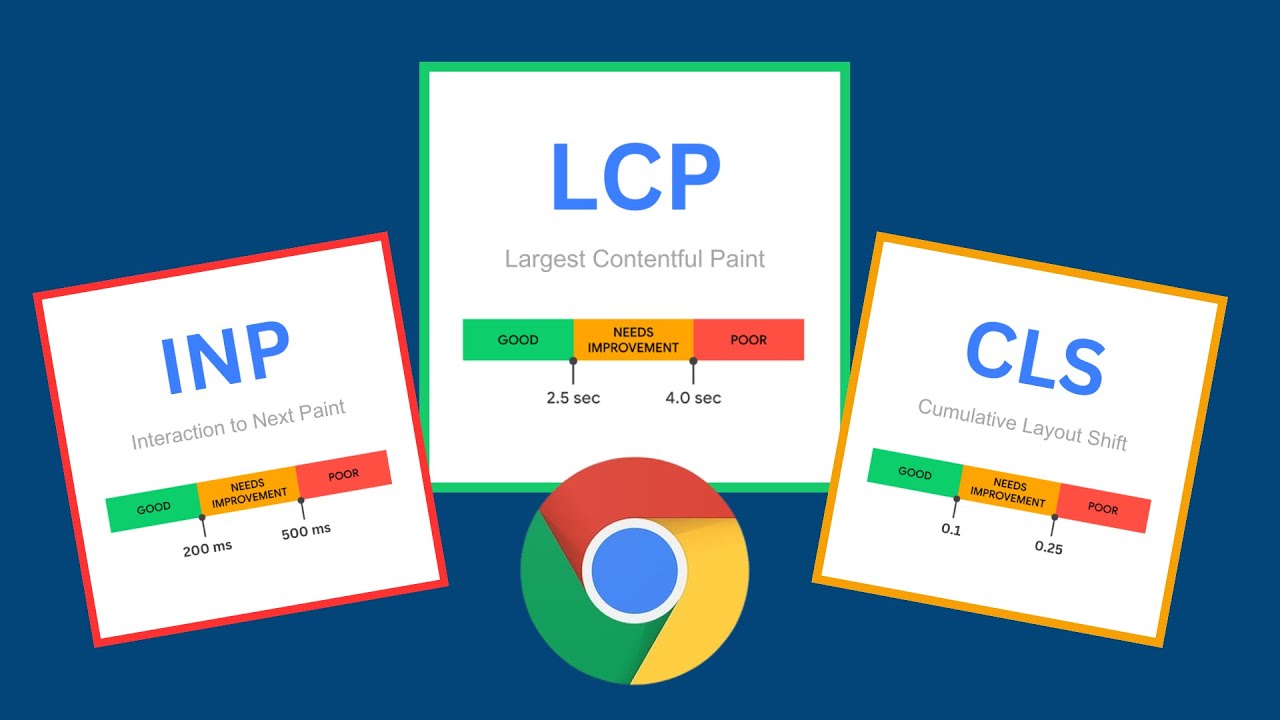
Core Web Vitals consist of three key metrics:

  • Largest Contentful Paint (LCP): Measures loading speed; aim for ≤2.5s.
  • Interaction to Next Paint (INP): Measures responsiveness; aim for ≤200ms.
  • Cumulative Layout Shift (CLS): Measures visual stability; aim for ≤0.1.

Read the official overview at web.dev/articles/vitals and developers.google.com/search/docs/appearance/core-web-vitals to learn definitions, thresholds, and differences between lab (simulated) and field (real-user) data.

Key Takeaway: These metrics focus on real-world user experience aspects like loading, interactivity, and stability.

Why this step matters:
  • -Builds foundational knowledge for diagnosing performance issues
  • -Enables confident interpretation of measurement tools in projects
1-2 hours
Web browser, web.dev documentation, Google Developers site
$0
Definition of Done
  • Can define LCP, INP, and CLS with their good thresholds
  • Explain lab vs field data differences
Common Mistakes to Avoid

Confusing lab data as real-user experience

Always cross-reference with field tools for validation

Ignoring device segmentation (mobile/desktop)

Check metrics at 75th percentile across devices

2

Following along, or just reading? 👀

Spin up a personalized “learn Core Web Vitals” plan you can save, check off, and return to anytime — unlimited on the free trial.

Start free trial →
3
4
5